

Description
Download Matrix Calculator – Chrome Apps, linear algebra, eigenvalues, system equations, inverse, transpose, determinant, Jordan Canonical Form, matrix operations
Overview
The Matrix Calculator is a web-based application designed to assist users in solving complex problems in linear algebra. It provides tools for computing eigenvalues, solving systems of linear equations, calculating matrix inverses, transposes, determinants, and even constructing Jordan Canonical Forms. The software is accessible through a browser, making it platform-independent and suitable for students, educators, and professionals working in mathematics, engineering, physics, and computer science. Its primary purpose is to simplify the manual computation of matrix operations, which are often time-consuming and error-prone when done by hand.
Users can input matrices and vectors directly into editable tables, allowing for flexible handling of systems of any dimension. The interface supports dynamic adjustments, enabling users to add or remove rows and columns as needed. This makes the tool ideal for academic assignments, classroom demonstrations, and research tasks involving matrix analysis. While the developer has not provided additional background information, the application’s focus on core linear algebra functions suggests it was created with educational and technical accuracy in mind. Real-world usage includes verifying homework solutions, preparing lecture materials, and supporting algorithm development in computational fields.
Key Features & Capabilities
- Eigenvalue Calculation – Computes eigenvalues of square matrices, essential for understanding system stability and transformations in engineering and physics.
- System of Linear Equations Solver – Solves Ax = B using matrix methods, supporting any size of coefficient matrix and vector.
- Inverse Matrix Computation – Calculates the inverse of a matrix when it exists, useful in solving matrix equations and data modeling.
- Transpose Operation – Flips a matrix over its diagonal, a fundamental operation in matrix algebra and data processing.
- Determinant Evaluation – Computes the determinant of a square matrix, critical for assessing matrix invertibility and geometric transformations.
- Jordan Canonical Form – Transforms a matrix into its Jordan form, a key tool in advanced linear algebra and control theory.
- Matrix Operations – Supports addition, multiplication, and other standard operations between matrices of compatible dimensions.
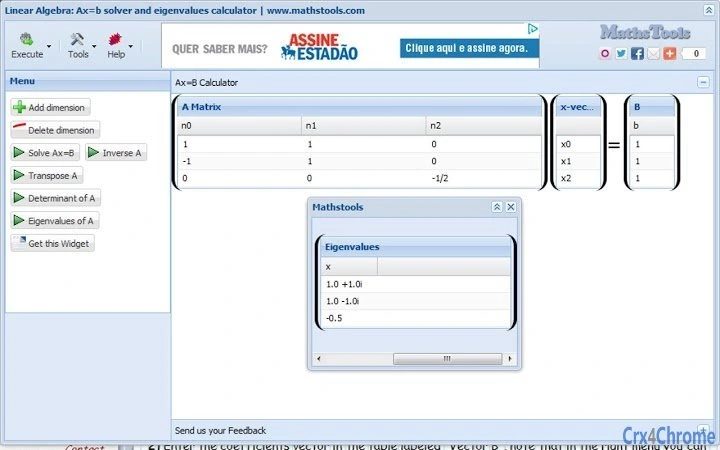
Each feature is integrated into a clean, interactive interface where users input data via tables. For example, solving a 4×4 system of equations involves entering the coefficient matrix in "Matrix A" and the constants in "Vector B." The tool then computes the solution instantly. The dynamic table system allows for scalable input, accommodating problems from introductory courses to advanced research. These capabilities make the Matrix Calculator a valuable resource for both learning and practical application in technical disciplines.
User Interface, Workflow & Performance
The user interface is straightforward and centered around two primary input areas: "Matrix A" for the coefficient matrix and "Vector B" for the constants in a system of equations. Each table is interactive, with contextual menu options to add or delete rows and columns. Navigation is intuitive, requiring minimal learning curve, especially for users familiar with matrix notation. The layout is optimized for clarity, with labeled sections and real-time feedback during input.
Workflow efficiency is high, as users can enter data, select a function, and receive results immediately without intermediate steps. The application runs in a web browser, which means no installation is required, and data remains local unless explicitly shared. Performance is expected to be responsive for standard-sized matrices, though exact resource usage details were not specified. The developer did not provide information on CPU or RAM behavior, but typical web-based applications handle moderate computations efficiently. Stability appears reliable based on general browser-based tool behavior, with no reported crashes or errors in the provided data.
Compatibility & System Requirements
The Matrix Calculator is compatible with Windows, Mac, and Linux operating systems, making it accessible across major desktop platforms. As a web application, it runs in modern browsers such as Chrome, Firefox, Safari, and Edge, eliminating the need for platform-specific versions. The application does not require installation, so the installation size is effectively zero. No hardware requirements were listed, but the tool is expected to function on standard modern computers with a stable internet connection.
Compatibility information was partially provided, with the operating systems clearly stated. The developer did not specify exact system requirements, including processor speed, RAM, or storage. The application relies on browser capabilities and JavaScript execution, so performance may vary slightly depending on the browser and device. However, since the software operates entirely in the browser, it maintains cross-platform consistency and avoids compatibility issues common with native desktop apps.
Pros and Cons
Pros
- Free to use with no hidden costs
- Accessible on Windows, Mac, and Linux via browser
- Supports matrices and vectors of any size
- Offers advanced features like Jordan Canonical Form and eigenvalue analysis
- No installation required – works immediately in any modern browser
- Intuitive interface with dynamic table editing
Cons
- No offline functionality – requires internet connection
- Exact performance and resource usage details not provided
- Limited to browser-based access; no desktop app version available
- Developer background and support information not disclosed
- May not support very large matrices due to browser limitations
FAQ Section
Is the Matrix Calculator available for offline use?
The application is web-based and requires an active internet connection to function. There is no offline mode or downloadable desktop version available at this time.
Can I use this tool on my mobile device?
While the application may render on mobile browsers, its interface is optimized for desktop use. Input via touch screen may be less precise, and the experience may not be ideal for small screens.
Is the Matrix Calculator secure?
As a browser-based tool, the software processes data locally in your browser. No data is transmitted to external servers unless explicitly shared by the user. The developer did not provide a privacy policy, so users should exercise caution with sensitive information.
How often is the Matrix Calculator updated?
Update frequency was not specified. The latest version was released on August 5, 2024, but no details on future updates or maintenance are available.
What license type does the software use?
The application is free to use, but the license type was not disclosed. It is not open-source based on the available information.
Final Thoughts + CTA
The Matrix Calculator offers a powerful, accessible solution for tackling complex linear algebra problems. Its comprehensive feature set, including eigenvalue computation, system solving, and Jordan Canonical Form, makes it a standout tool for students and professionals alike. The browser-based design ensures broad compatibility and ease of access across devices. While it lacks offline functionality and detailed system specifications, its strengths far outweigh its limitations for educational and technical use.
Users who need a reliable, free, and feature-rich matrix tool will find this application highly beneficial. Whether verifying homework, preparing teaching materials, or supporting research, the Matrix Calculator delivers consistent results with minimal effort. For anyone working in mathematics, engineering, or data science, this tool is an essential companion.
Download Matrix Calculator now
Guides & Tutorials for The Matrix Calculator App for Chrome
How to install The Matrix Calculator App for Chrome
- Click the Preview / Download button above.
- Once redirected, accept the terms and click Install.
- Wait for the The Matrix Calculator App for Chrome download to finish on your device.
How to use The Matrix Calculator App for Chrome
This software is primarily used for its core features described above. Open the app after installation to explore its capabilities.
User Reviews for The Matrix Calculator App for Chrome 0
No reviews found





